See how much of your plan you have left.
A menu bar gauge of your 5-hour and weekly limits, and the pace you're burning them at, for every Claude Code and Codex account on your Mac. Out of the box it reads what each tool already writes down: no login, no API calls. Switch on Live and it checks your account directly too.
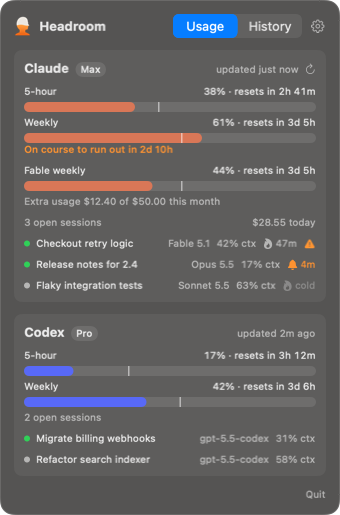
Every account at once
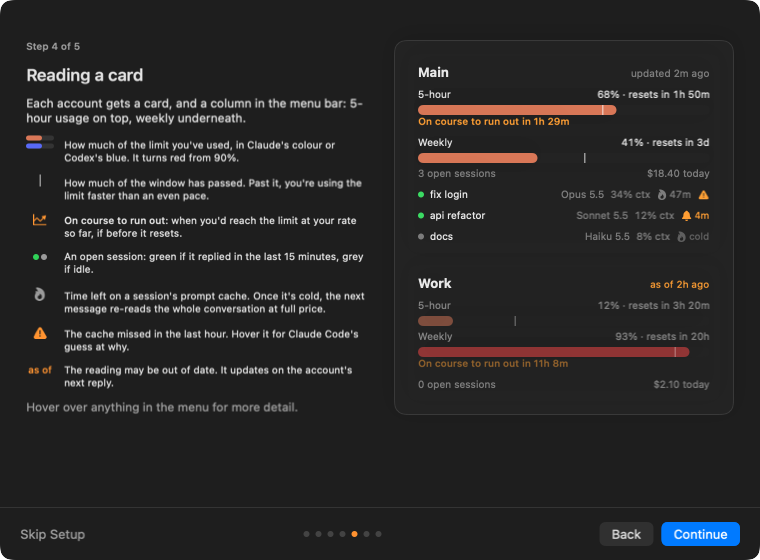
A column per account in the menu bar, or only the ones you want there. Open it for reset countdowns, the sessions you have running, and how fast you're going. Each tool keeps its own colour.
Claude Code
Connect a folder and Headroom hears every reply through its status line, which keeps working as before. You also get today's cost and each conversation's prompt cache.
Codex
Track a folder and Headroom reads the logs Codex already keeps, from the CLI, IDE extension and app. No login, nothing changed, plus any model's own limit while you're using it.
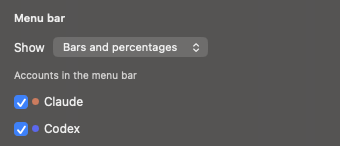
As much menu bar as you want
Settings picks which accounts get a column, and how much each one shows. Leave an account out, drop the percentages, or shrink the whole thing to an icon. The dropdown always shows everything.
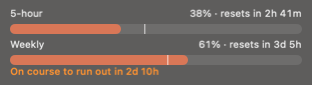
Know your pace
A line on each bar marks how much of the window has passed. Ahead of it, Headroom says when you'd run out at this rate.
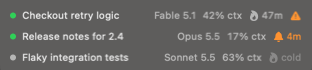
Mind the cache
Each Claude Code conversation shows how long until its prompt cache goes cold and the next message costs full price. A warning marks one that missed.
Warned in time
Alerts at 80% or 90% of any limit, and when it resets. Click a flame for a nudge five minutes before that cache goes cold.

What used it
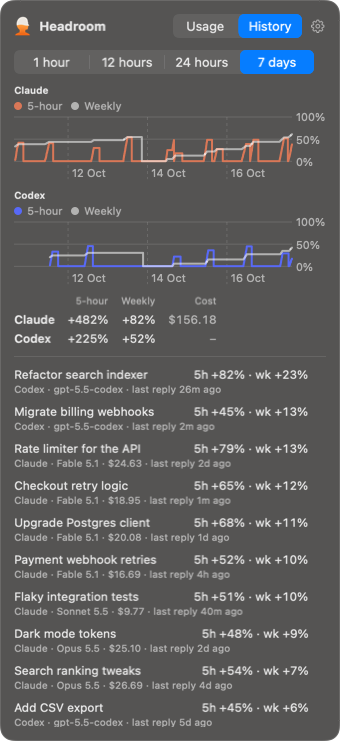
History charts each account's 5-hour and weekly usage over the last hour, 12 hours, day or week, then lists the conversations that took the most from your limits.
With Live on, readings from claude.ai and your other devices land here too, so use from elsewhere isn't pinned on your next Claude Code conversation.
Private by default
Reads, never writes
Headroom reads what Claude Code and Codex already write down. Unless you switch on Live, it never touches your login or calls Anthropic or OpenAI.
Live, if you want it
Switch it on for a Claude account to count use from claude.ai and other devices, and to see a model's own weekly limit and your extra usage. It reads your login only when you ask, and keeps it in memory.

Keeps itself current
Once a day it asks GitHub for a new release and offers to install it. Switch that off and leave Live off, and Headroom makes no network requests at all.
Set up in a minute
The first time it opens, a guide finds your Claude Code and Codex folders, connects the ones you pick, and explains every bar, line and icon on a card.
Install
Needs macOS 14, and Claude Code signed in with a Pro, Max or Team plan, Codex signed in with ChatGPT, or both. The prompt cache countdown needs Claude Code 2.1.251 or later.
curl -fsSL https://raw.githubusercontent.com/DanPurdy/headroom/main/scripts/install.sh | bashOr download Headroom 0.10.1 and move it to Applications. It isn't notarised yet, so allow it under Privacy & Security the first time.
- Open Headroom. A setup guide lists the accounts it found.
- Label each one, then Connect a Claude Code folder or Track a Codex one.
- Send a message in either. Its usage appears.
Skipped the guide? Click the gauge, then the gear. It's under Setup guide… there.